1、KES RWC读写分离集群介绍
1.1 介绍
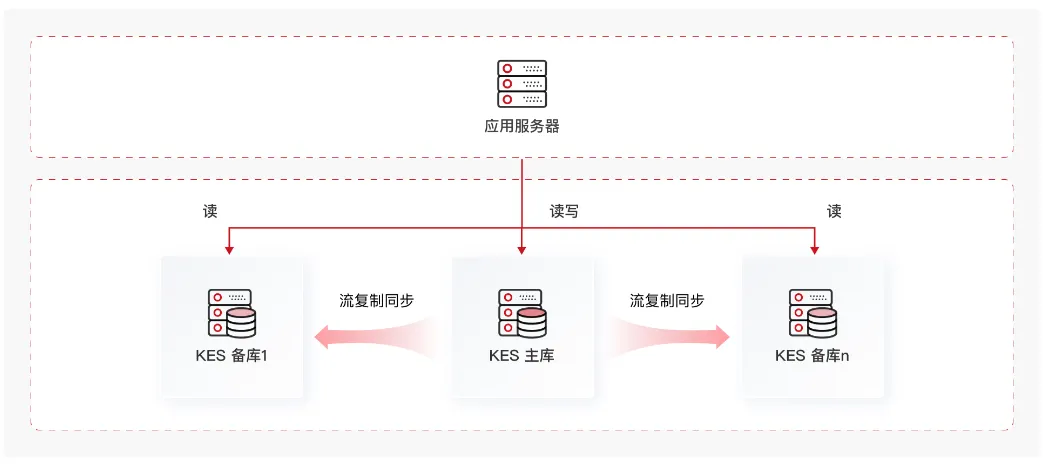
金仓数据库管理系统读写分离集群软件(简称KingbaseES RWC)在金仓数据守护集群软件的基础上增加了对应用透明的读写负载均衡能力。相比数据守护集群,该类集群中所有备库均可对外提供查询能力,从而减轻了主库的读负载压力,可实现更高的事务吞吐率;该软件支持在多个备库间进行读负载均衡。
1.2 核心优势
- 高可用性:支持配置多个备库节点,确保主库故障时能在3秒内切换。支持非硬件故障的主机/备机恢复后能自动重新加入集群并同步数据。
- 读写分离:基于事务级别的读写分离方案,通过JDBC驱动自动识别SQL语句读写种类,写语句发给主机,分发读语句到备机,从而实现读写分离。
- 负载均衡:驱动分发器均衡的将读操作均衡地分配到所有备库节点,降低主库的读写冲突,提高查询性能。
- 在线拓展:支持在线增加备库节点,新节点会被集群自动识别、同步日志,并参与读操作负载均衡。
- 性能提升:显著提升了读密集型应用系统的数据库响应能力。例如,70%读操作的应用通过部署2节点读写分离,可提升整体性能1.5倍以上。
1.3 KES RWC 架构图
1.4 实现原理
1.4.1 数据同步原理:基于 WAL 的物理流复制
KES 基于 PostgreSQL 内核,主备数据同步的核心是 WAL(Write-Ahead Log,预写式日志 / REDO 日志)流复制:
- 主库上每个事务的修改都会先产生 WAL 日志(先写日志再改数据页,保证崩溃可恢复);
- 主库的 WAL Sender 进程把日志以流式方式实时推送到备库;
- 备库的 WAL Receiver 接收日志并回放(重做),使备库数据与主库保持一致;
- 备库处于 recovery(恢复)模式持续回放,同时以 hot standby 方式对外提供只读查询。
几个关键概念:
| 概念 | 说明 |
|---|---|
| esrep 用户 | 集群自动创建的流复制专用账户,备库用它连接主库拉取 WAL |
| LSN_Lag | 日志序列号延迟,反映备库落后主库的程度,0 bytes 即完全同步 |
| synchronous 同步模式 | quorum(默认,首个完成 WAL 回放的备库为同步节点)/ sync / all / async |
| 归档(archive_mode) | 开启 WAL 归档,保证日志不丢失,支持时间点恢复 |
流复制是"物理复制"——按数据页 + 日志字节流同步,备库与主库完全一致,这是 KRWC 数据一致性的根基。
1.4.2 双层守护进程:集群的"大脑"
每个节点都运行两个守护进程协同工作,这是 KES 集群区别于原生 PG 流复制的关键所在:
1. repmgrd(核心层) —— 源自 PostgreSQL 生态的 repmgr 并经金仓化改造
- 持续检查数据库状态
- 故障自动切换(Failover):主库故障时把备库提升为新主库
- 故障自动恢复:故障节点修复后自动重新加入集群
2. kbha(上层监控)
- 监控 repmgrd 进程是否存活(防止 repmgrd 自身成为单点故障)
- 信任网关检查:探测对端节点是否真的存活,防止网络分区误判
- 存储检测等环境级健康检查
为什么要双层? repmgrd 管数据库层故障,但它自己也可能挂掉;kbha 在上层盯着 repmgrd,保证"监控者本身也被监控",避免守护进程成为单点。这种分层设计显著提升了高可用的可靠性。
1.4.3 故障自动转移(Failover)原理
当主库发生故障时:
- 各节点 repmgrd 周期性探测,发现主库不可达;
- 通过信任网关(trusted_servers)互相探测,确认是主库真故障而非网络分区误判;
- 备库执行 promote(提升),切换为新的主库,timeline(时间线)+1(用于区分不同的主库历史);
- VIP 漂移到新主库所在节点——通过 arping 发送免费 ARP,让交换机/客户端快速感知 VIP 的新 MAC 地址,应用几乎无感切换;
- 其他备库执行 follow,重新指向新主库,重建流复制通道。
防脑裂机制:通过信任网关探测 + 可选的 Witness(见证)节点仲裁投票,避免网络分区导致同时出现两个主库。Witness 不承载数据,只参与仲裁。
1.4.4 故障自动恢复原理
原主库修复重新上线后:
- repmgrd 检测到原主库重新出现;
- 自动执行 rejoin(重新加入),将原主库以 standby 身份重新纳入集群(角色降级);
- 通过基础备份 + WAL 追平数据差异,对齐到新主库当前状态;
- 恢复流复制通道,集群恢复一主一备的正常拓扑。
1.4.5 读写分离与读负载均衡
- 写操作 → 路由到主库
- 读操作 → 分发到备库(一主多备时在多个备库间负载均衡)
- 对应用透明:应用只需连接 VIP,由集群内部完成读写分流
备库的 hot standby 模式允许在 recovery 回放 WAL 的同时接受只读查询,这样读请求不必压在主库上,提升了整体吞吐。一般业务系统中读远多于写,读写分离能有效减轻主库压力。
1.4.6 VIP(虚拟IP)机制
- VIP 是对外的统一访问入口,应用只连 VIP,不直连节点 IP;
- VIP 绑定在主库所在节点上;
- 故障切换时 VIP 自动漂移到新主库节点;
- 通过 arping 发送免费 ARP 更新 ARP 缓存,让网络快速感知新位置。
这样无论主库怎么切换,应用连接的地址不变,业务连续性得到保障。
1.4.7 节点间安全通信
| 阶段 | 通道 | 说明 |
|---|---|---|
| 部署阶段 | SSH 免密(22) | trust_cluster.sh 配置 root / kingbase 用户双向互信 |
| 运行时 | sys_securecmdd(8890) | 比 SSH 更安全、更可控的专用通信通道 |
部署时用 SSH 完成软件分发和初始化,运行时切换到 sys_securecmdd 承载守护进程间的状态同步与远程命令执行。
1.4.8 原理归纳
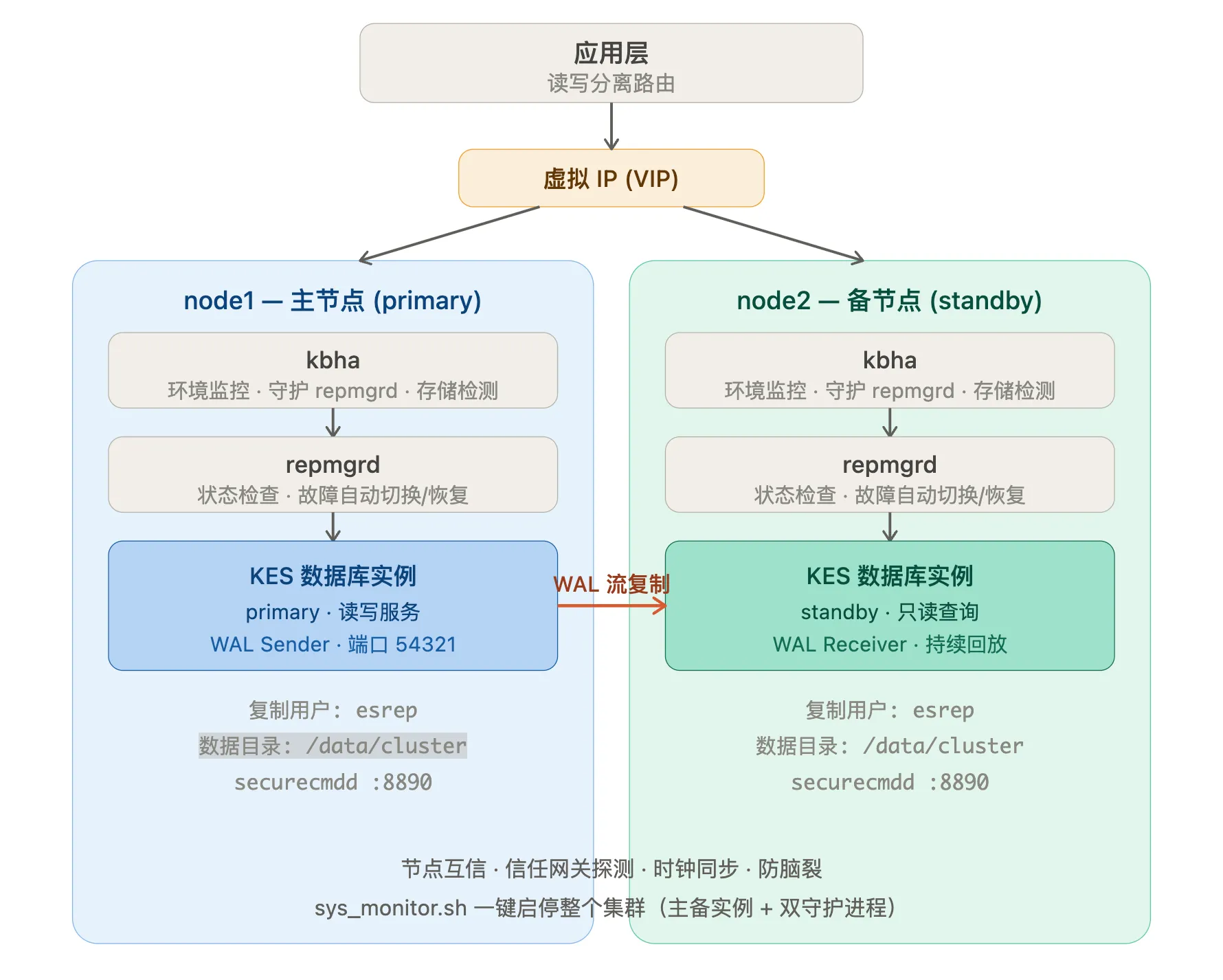
一句话总结: "单机变集群主节点"的本质是——保留原数据目录,在其上叠加复制配置使其具备主库能力,再用基础备份建立一个对等的备库,最后用双层守护进程 + VIP 把它们编织成一个具备自动故障转移、自动恢复、读写分离能力的高可用集群。 这就是 KRWC 的核心实现原理。
2、部署KES RWC读写分离集群
在实际生产环境中,部署模式主要有单机、集群和单机转集群三种。其中,单机和集群模式相对简单,不展开说明,本文主要阐述,如何将已部署的单机KES“升级”为一主一备(KRWC)高可用集群,以满足生产上线所需的高可用与读写分离要求。
2.1 环境准备
- 准备一台已经部署了 KES V9 的数据库,用于集群的主节点。【安装 KES V9 数据库可参考:https://opforge.srebro.cn/database/kingbase/02.html】
- 提供一台全新的服务器,作为新节点为集群的备节点
2.2 环境信息
| 名称 | 版本 | 备注 |
|---|---|---|
| KES数据库 | V009R001C010B0004_Lin64 | Linux-x86架构 |
| KES数据库 用户名/密码 | system/kingbase | |
| cluster 集群数据目录 | /home/application/KingbaseES/data | 保留原数据目录,原数据库数据需要转成集群数据,所以原来数据库data路径保持不变 |
| cluster 集群安装目录 | /home/application/KingbaseES/cluster | |
| cluster 集群软件包目录 | /home/application/KingbaseES/install/cluster-soft | |
| cluster 集群管理用户 | kingbase系统用户 | |
| 服务器操作系统 | 麒麟 V10 SP3 /OpenEuler 22.03 LTS SP4 | 麒麟系统为主节点,OpenEuler 系统备节点 |
| 服务器资源 | 16C32g300G | * 2 |
| 主节点IP | 172.24.0.156 | 主机名: node1 |
| 备节点IP | 172.24.0.157 | 主机名: node2 |
2.3 实现方式
使用KES V9R1C10自带的数据库部署工具,通过命令的操作方式,将node1单节点KES服务器扩展为一主一备的KRWC集群。
- KES原单机节点变为集群的主节点。
- 新节点为集群的备节点。
- 部署过程中需要暂时停掉KES实例,部署完成后,自动启动集群。
2.4 服务器初始化/集群软件包配置
2.4.1 在主库节点上操作
使用root用户执行以下步骤
- 设置主机名
hostnamectl set-hostnmae node1- 创建集群安装目录,集群软件包目录
mkdir -p /home/application/KingbaseES/cluster
mkdir -p /home/application/KingbaseES/install/cluster-soft
获取集群软件包
软件存放在${install_dir}/KESRealPro/${version}/Assistants/kconsole/zip/目录下,${install_dir}为单机数据库的软件安装路径,${version}为版本号。
软件包名 备注 cluster_install.sh 部署脚本 db.zip 数据库服务器压缩包 install.conf 部署配置文件 securecmdd.zip 集群服务器通信工具 trust_cluster.sh SSH 部署互信脚本 - 复制软件包到集群软件包目录下
cp -rp /home/application/KingbaseES/V9/KESRealPro/V009R001C010/Assistants/kconsole/zip/* /home/application/KingbaseES/install/cluster-soft/- 修改文件权限
chmod -R 775 /home/application/KingbaseES/install/cluster-soft- 赋权 kingbase 用户对集群目录的所有权
chown -Rf kingbase:kingbase /home/application/KingbaseES/

#查看权限
ls -l
总用量 335344
-rwxrwxr-x 1 kingbase kingbase    256804  6月 26  2023 cluster_install.sh
-rwxrwxr-x 1 kingbase kingbase 340492421  6月 26  2023 db.zip
-rwxr-xr-x 1 kingbase kingbase     20889  7月  3 11:04 install.conf
-rwxrwxr-x 1 kingbase kingbase   2597558  6月 26  2023 securecmdd.zip
-rwxrwxr-x 1 kingbase kingbase 9678 6月 26 2023 trust_cluster.sh- 登录当前单机数据库,创建一个 sre库,以此来验证扩容之后的集群内的数据
su - kingbase

[kingbase@localhost ~]$ ksql test system
用户 system 的口令:
授权类型: 企业版.
输入 "help" 来获取帮助信息.

test=# create database sre;
CREATE DATABASE

test=# \l
                                        数据库列表
   名称    | 拥有者 | 字元编码 |  校对规则   |    Ctype    | ICU 排序 |     存取权限
-----------+--------+----------+-------------+-------------+----------+-------------------
 kingbase  | system | UTF8     | zh_CN.UTF-8 | zh_CN.UTF-8 |          |
 security  | system | UTF8     | zh_CN.UTF-8 | zh_CN.UTF-8 |          |
 sre       | system | UTF8     | zh_CN.UTF-8 | zh_CN.UTF-8 |          |
 template0 | system | UTF8     | zh_CN.UTF-8 | zh_CN.UTF-8 |          | =c/system        +
           |        |          |             |             |          | system=CTc/system
 template1 | system | UTF8     | zh_CN.UTF-8 | zh_CN.UTF-8 |          | =c/system        +
           |        |          |             |             |          | system=CTc/system
 test      | system | UTF8     | zh_CN.UTF-8 | zh_CN.UTF-8 |          |
(6 行记录)

test=#- 停止当前单机数据库
sys_ctl stop2.4.2 在备库节点上操作
使用root用户执行以下步骤
- 设置主机名
hostnamectl set-hostnmae node2- 关闭SELINUX
setenforce 0
sed -i "s#SELINUX=enforcing#SELINUX=disabled#g" /etc/selinux/config - 关闭firewalld
systemctl stop firewalld
systemctl disable firewalld- 修改系统资源限制参数
cat >> /etc/security/limits.conf << eof
root soft nofile 65535
root hard nofile 65535
root soft nproc 65535
root hard nproc 65535
root soft core unlimited
root hard core unlimited
* soft nofile 65535
* hard nofile 65535
* soft nproc 65535
* hard nproc 65535
* soft core unlimited
* hard core unlimited
eof


#进入到/etc/security/limits.d/下,删除 *-nproc.conf
cd /etc/security/limits.d/
rm -rf *-nproc.conf- 配置内核参数
cat >>/etc/sysctl.conf<<'EOF'
kernel.sem = 50100 64128000 50100 1280
fs.aio-max-nr = 1048576
fs.file-max = 6815744
vm.swappiness = 1
vm.overcommit_memory = 2
vm.overcommit_ratio=90
vm.dirty_ratio =2
vm.dirty_background_ratio=1
vm.min_free_kbytes = 512000
kernel.shmall = 1572864
kernel.shmmax = 6442450944
kernel.shmmni = 4096
net.ipv4.ip_local_port_range = 10000 65000
net.core.rmem_default = 262144
net.core.rmem_max = 4194304
net.core.wmem_default = 262144
net.core.wmem_max = 1048576
net.core.somaxconn=1024
net.core.netdev_max_backlog = 32768
net.core.wmem_default = 8388608
net.core.wmem_max = 16777216
net.core.rmem_default = 8388608
net.core.rmem_max = 16777216
net.ipv4.tcp_keepalive_time = 1200
net.ipv4.tcp_keepalive_probes = 3
net.ipv4.tcp_keepalive_intvl = 30
net.ipv4.tcp_max_syn_backlog = 8192
net.ipv4.tcp_max_tw_buckets = 6000
net.ipv4.tcp_max_syn_backlog = 65536
net.ipv4.tcp_synack_retries = 2
net.ipv4.tcp_syn_retries = 2
net.ipv4.route.gc_timeout = 100
net.ipv4.tcp_wmem = 8192 436600 873200
net.ipv4.tcp_rmem = 32768 436600 873200
net.ipv4.tcp_mem = 94500000 91500000 92700000
net.ipv4.tcp_max_orphans = 3276800
net.ipv4.tcp_syncookies = 1
net.ipv4.tcp_tw_reuse = 1
net.ipv4.tcp_fin_timeout = 30
EOF

#使内核生效
sysctl -p- 配置时区
timedatectl set-timezone Asia/Shanghai- 安装 java 环境
yum install java-11-openjdk

#验证java版本
java -version
openjdk version "11.0.30" 2026-01-20
OpenJDK Runtime Environment BiSheng (build 11.0.30+7)
OpenJDK 64-Bit Server VM BiSheng (build 11.0.30+7, mixed mode, sharing)- 创建集群安装目录
mkdir -p /home/application/KingbaseES/cluster- 赋权 kingbase 用户对集群安装目录的所有权
chown -Rf kingbase:kingbase /home/application/KingbaseES/2.5 安装集群
2.5.1 官方参数配置说明
- 官方文档: https://docs.kingbase.com.cn/cn/KES-V9R1C10/availability/rwc/CLI_Installation/Parameter_Config
官方的install.conf参数文件内容如下:
## install.conf
## cluster deployment script configuration instructions:
##    path: in the same path as cluster_install.sh.
##    parameter: could be set in the config file, also could be set in cluster_install.sh script(give priority to the configuration in this file).
##    constraints: 1. SSH encryption needs to be manually configured between the devices on which the script is run and the devices installed in the cluster, including between root users, ordinary users, root user and ordinary users.
##                 2. general-purpose computers can only be executed on ordinary users who are configured with SSH encryption, and BMJ can only be executed on root user, and all must be executed on the primary host.
##                 3. db.zip package decompression is completed at the directory level such as lib, bin, share, there can not be one more layer of directories in the middle, the directory like "kingbase/bin" can not be supported.
##                 4. automatic switching, automatic recovery, quorum synchronization mode are enabled by default, scram-sha-256 cluster is enabled by default.

## instructions:
##     if you are currently in BMJ or deploy_by_sshd=0, you need to ensure that all hosts have successfully installed the database and that sys_securecmdd is in the startup state

######################################################################
# Required parameters
#####################################################################
[install]
## whether it is BMJ, if so, on_bmj=1, if not on_bmj=0, defaults to on_bmj=0
on_bmj=0

## the cluster node IP which needs to be deployed, is separated by spaces.
## for example:  all_ip=(192.168.1.10 192.168.1.11) or all_ip=(host0 host1)
## means deployed cluster of DG ==> ha_running_mode='DG'
all_ip=()

## only set if need to setup witness node in cluster.
## The value is the IP of witness node, for example: witness_ip="192.168.1.13" or witness_ip="host3"
## it must be NULL when ha_running_mode='TPTC'
witness_ip=""

## the node IP will deployed in PRODUCTION, could not set it when all_ip is not NULL.
## the virtual_ip must be NULL, and auto_cluster_recovery_level will be 0.
## means deployed cluster of TPTC ==> ha_running_mode='TPTC'
## Cannot be configured as a domain name
production_ip=()

## the node IP will deployed in LOCAL DISASTER, could not be NULL if the production_ip is not NULL.
## Cannot be configured as a domain name
local_disaster_recovery_ip=()

## the node IP will deployed in REMOTE DISASTER, it could be NULL even the production_ip is not NULL.
## Cannot be configured as a domain name
remote_disaster_recovery_ip=()

## the path of cluster to be deployed, for example: install_dir="/home/kingbase/tmp_kingbase" [if it is BMJ, you do not need to configure this parameter]
## the directory structure after deployment:
##           ${install_dir}/kingbase/data                      the data directory
##           ${install_dir}/kingbase/archive                   log archive directory
##           ${install_dir}/kingbase/etc                       configuration file directory
##           ${install_dir}/kingbase/bin、lib、share、log      install file directory
## the last layer of directory could not add '/'
install_dir="/home/kingbase/cluster/install"

## the absolute path of zip package, for example: zip_package="/home/kingbase/db.zip" [if it is BMJ or deploy_by_sshd=0, you do not need to configure this parameter]
## zip、tar and tar.gz package can be supported.
zip_package=""

# set license check type. must be one of ('default' 'UKey' 'LAC'). default is 'default'
# license_type='default'. it will be use license_file
# license_type='UKey'. it will be use UKey.
# license_type='LAC'. it will create lac_agent.conf into ${KINGBASE_HOME}/share dir.
license_type="default"

## the name of license.dat [if it is BMJ or deploy_by_sshd=0, you do not need to configure this parameter]
## if there is no license file set, the default license file in zip_package will be read.
## if there are multiple license files, please write down all of them.
## make sure that the write order of license.dat file is the same as that of all_ip, if the same license file can be used in different devices, you can just write once.
## since the license file must named with "license.dat", if you have more than one license files, please use different name to distinguish them.
## example: license_file=(license.dat) or license_file=(license.dat-1 license.dat-2)
license_file=()


# set LAC server ip address. must be string like '192.168.1.100'
lac_host=''

# set LAC server port.
lac_port=11234

# set product type. must be one of ('Ent' 'Pro' 'Std' 'Dev'). example lac_type='Pro'
lac_type=''

# activation file's lable or UUID
activation_file=''

# use VCPU mode when use LAC
use_vcpu_limit=0

# database initializes user configuration
db_user="system"                 # the user name of database
#db_password=""                  # the password of database.
db_port="54321"                  # the port of database, defaults is 54321
db_mode="oracle"                 # database mode: pg, oracle, mysql, sqlserver
db_auth="scram-sha-256"          # database authority: scram-sha-256, md5, scram-sm3, sm4, default is scram-sha-256
db_case_sensitive="yes"          # database case sensitive settings: yes, no. default is yes - case sensitive; no - case insensitive
                                 # (NOTE. cannot set to 'no' when db_mode="pg", and cannot set to 'yes' when db_mode="mysql" or db_mode="sqlserver").
db_checksums="yes"               # the checksum for data: yes, no. default is yes - a checksum is calculated for each data block to prevent corruption; no - nothing to do.
archive_mode="always"                # enables archiving; off, on, or always

encoding="UTF8"                  # set default encoding for new databases. must be one of ('default' 'UTF8' 'GBK' 'GB2312' 'GB18030')
locale="zh_CN.UTF-8"             # set default locale for new databases.
                                 # +===============================================================================+
                                 # |  encoding  |  locale          |    initdb options                             |
                                 # +============+==================+===============================================+
                                 # |  default   |  *default        |    --lc-messages='C'                          |
                                 # +            +------------------+-----------------------------------------------+
                                 # |            |  C               |    --locale='C' --lc-messages='C'             |
                                 # +------------+------------------+-----------------------------------------------+
                                 # |            |  C               |    --locale='C' --lc-messages='C'             |
                                 # +            +------------------+-----------------------------------------------+
                                 # |   UTF8     |  *zh_CN.UTF-8    |    --locale='zh_CN.UTF-8' --lc-messages='C'   |
                                 # +            +------------------+-----------------------------------------------+
                                 # |            |  en_US.UTF-8     |    --locale='en_US.UTF-8' --lc-messages='C'   |
                                 # +------------+------------------+-----------------------------------------------+
                                 # |   GBK      |  C               |    --locale='C' --lc-messages='C'             |
                                 # +            +------------------+-----------------------------------------------+
                                 # |            |  *zh_CN.GBK      |    --locale='zh_CN.GBK' --lc-messages='C'     |
                                 # +------------+------------------+-----------------------------------------------+
                                 # |   GB2312   |  C               |    --locale='C' --lc-messages='C'             |
                                 # +            +------------------+-----------------------------------------------+
                                 # |            |  *zh_CN.GB2312   |    --locale='zh_CN.GB2312' --lc-messages='C'  |
                                 # +------------+------------------+-----------------------------------------------+
                                 # |   GB18030  |  C               |    --locale='C' --lc-messages='C'             |
                                 # +            +------------------+-----------------------------------------------+
                                 # |            |  *zh_CN.GB18030  |    --locale='zh_CN.GB18030' --lc-messages='C' |
                                 # +============+==================+===============================================+

other_db_init_options=""         # addional initdb options, such as "--scenario-tuning" (NOTE. can only be set --scenario-tuning when db_mode="oracle")
sync_security_guc="no"           # sync security GUC parameters in cluster (exclude witness): yes, no. default is no.
                                 # yes - for auto sync security GUC, create extension kdb_schedule and security_utils; no - nothing to do.

tcp_keepalives_idle="2"          # (integer; default: 7200; since Linux 2.2)
                                 # The  number  of  seconds  a  connection  needs to be idle before TCP begins sending out keep-alive counts.  Keep-alives are sent only when the
                                 # SO_KEEPALIVE socket option is enabled.  The default value is 7200 seconds (2 hours).  An idle connection is terminated after approximately  an
                                 # additional 11 minutes (9 counts an interval of 75 seconds apart) when keep-alive is enabled.

tcp_keepalives_interval="2"      # (integer; default: 75; since Linux 2.4)
                                 # The number of seconds between TCP keep-alive counts.

tcp_keepalives_count="3"         # (integer; default: 9; since Linux 2.2)
                                 # The maximum number of TCP keep-alive counts to send before giving up and killing the connection if no response is obtained from the other end.
tcp_user_timeout="9000"          # (since Linux 2.6.37)
connection_timeout="10"          # connection timeout when use ssh or sys_securecmdd
wal_sender_timeout="30000"       # in milliseconds; 0 disables
wal_receiver_timeout="30000"     # time that receiver waits for
                                 # communication from master
                                 # in milliseconds; 0 disables


## the trust ip, which separated by English ',', and spaces are not allowed.
## For example: trusted_servers="192.168.20.25,192.168.20.26" or trusted_servers="host5,host6"
trusted_servers=""

## if failed to ping trusted_servers, the database can still be running? on, off. default is on - do nothing, the database will running; off - will stop the database.
running_under_failure_trusted_servers='on'

#####################################################################
# Optional parameters
#####################################################################

## Will or not use the data directory which is already exists on one node.
#  0: there is no data, will generate the data directory by initdb.
#  1: there is only one data, use it as the primary node. (In TPTC, the data directory must on any node of produtcion_ip.)
use_exist_data=0

## the path of data directory, BMJ defaults to "/opt/Kingbase/ES/V8/data", the general machine defaults to "install_dir/kingbase/data"
data_directory=""

## if seperate sys_wal from data directory, set the sys_wal location to waldir.
## the location should not be under the data directory
## the location should be an absolute path
## the waldir should be an empty path or nonexistent, initdb would create the location if it's nonexistent
waldir=''

## the vitural IP, for example: virtual_ip="192.168.28.188/24"
virtual_ip=""

## ignore any VIP operation failure.
##  on: continue to complete the command event if failed to load/arping/unload VIP (except in failover).
##  off: abort the command if failed to load/arping/unload VIP. (default)
ignore_vip_failure='off'

## the net device, after configuring the vitural IP, net_device must been configured.
## please make sure that the writing order of net_device is the same as all_ip, if the net_device is the same, it should also be written together.
## do not need to consider net_device on witness node if configured witness_ip
## for example: net_device=(ens192 ens192) or net_device=(ens192 eth0)
net_device=()

## the net device ip, after configuring the vitural IP, net_device_ip must been configured.
## please make sure that the writing order of net_device_ip is the same as all_ip
## do not need to consider net_device_ip on witness node if configured witness_ip
## for example: net_device_ip=(192.168.1.10 192.168.1.11) or net_device_ip=(host0 host1)
net_device_ip=()

## the path of ip, arping, ping command, defaults is /sbin or /bin
## by default, the arping_path is located in the bin directory of the database installation directory, if arping_path is null, then use default value.
## for example, if there is BMJ, arping_path=/opt/Kingbase/ES/V8/Server/bin
ipaddr_path="/sbin"
arping_path=""
ping_path="/bin"

## deploy option, if root authority is provided when deploy.
## default is 1, it is permit to deploy with root. 0 means deploy without root.
install_with_root=1

## super user, defaults is root
super_user="root"

## ordinary user, defaults is kingbase
execute_user="kingbase"

## other cluster parameters
deploy_by_sshd=1                 # choose whether to use sshd when deploy, 0 means not to use (deploy by sys_securecmdd), 1 means to use (deploy by sshd), default value is 1; when on_bmj=1, it will auto set to no(deploy_by_sshd=0)
use_scmd=1                       # Is the cluster running on sys_securecmdd or sshd? 1 means yes (on sys_securecmdd), 0 means no (on sshd), default value is 1. sys_securecmdd service need root; when on_bmj=1, it will auto set to yes(use_scmd=1)
reconnect_attempts="10"          # the number of retries in the event of an error
reconnect_interval="6"           # retry interval
recovery="standby"               # the way of cluster recovery: standby/automatic/manual
ssh_port="22"                    # the port of ssh, default is 22
scmd_port="8890"                 # the port of sys_securecmdd, default is 8890

## ssl option, default value is '0', will not use ssl in cluster.
## set use_ssl=1 in database, and the cluster will use 'sslmode=require' to connect to database.
use_ssl=0

## all nodes failed recovery option, default value 1, do auto recovery when all nodes failed when network is OK and only one primary in cluster.
## 0 means disable the all fails recovery feature
## 2 means  max availability option,the cluster must contains two nodes and the trust server must be set, the recovery must be set to automatic.
auto_cluster_recovery_level='1'

## enable the disk check, default value is 'off', will do nothing when disk is error.
## if set to 'on', stop the database when disk is error.
use_check_disk='off'

## setting for kingbase synchronous_standby_names mode, values in "quorum\sync\all\async\custom"
##   quorum: the first do WAL replay standby can be sync node
##   sync:    the first standby in synchronous_standby_names, which connect to primary now, is sync node
##   all:     all the standbys in synchronous_standby_names, which connect to primary now, are sync node, and if there is no standby connect to primary, it is equal to async
##   async:   no standby is sync node
##   custom:  support for configuring the role of each node, and each node in the cluster must be assigned a role.
## For ha_running_mode='TPTC' the synchronous default value is 'all'.
## For ha_running_mode='DG', the synchronous default value is 'quorum'.
synchronous=''

## set nodes role as a sync nodes.
## the sync_nodes, which separated by English spaces.
## this parameter is only valid when synchronous is custom mode.
## the nodes in the sync_nodes parameter must all come from the all_ip parameter.
## for example:  synchrongous_nodes=(192.168.1.10 192.168.1.11) or synchrongous_nodes=(host0 host1)
## if the ha_running_mode is 'TPTC',sync_nodes are invalid.
sync_nodes=()

## set nodes role as a potential nodes.
## other rules are consistent with parameter sync_nodes.
potential_nodes=()

## set nodes role as a async nodes.
## other rules are consistent with parameter sync_nodes.
async_nodes=()

## For ha_running_mode='TPTC', if the sync nodes have the same location with primary ?
##    0:    some nodes could be sync nodes. (don't care what the location is)
##    1:    only the nodes have same location with primary, could be sync nodes.
## the default is 0. (when ha_running_mode='DG' or synchronous='async', this parameter has no effect)
sync_in_same_location=0

## For ha_running_mode='TPTC', if we can do failover when the standby node has different location with failure primary?
##    'off':  can not do failover, if the standby node has different location with primary.
##    'none': can do failover.
##    'any':  can do failover, need ANY server alive in primary's location if the standby node has different location with primary.
##    'all':  can do failover, need ALL servers alive in primary's location if the standby node has different location with primary.
## the default is off. (when ha_running_mode='DG', this parameter has no effect)
failover_need_server_alive='off'

## config of create a standby/witness node.
## when the cluster is in quorum or sync mode and expand sync standby node,
## it may automatically adjust synchronous_node and synchronous_standby_count parameters.
[expand]
expand_type=""                   # The node type of standby/witness node, which would be add to cluster. 0:standby  1:witness
primary_ip=""                    # The ip addr of cluster primary node, which need to expand a standby/witness node.
                                 # for example: primary_ip="192.168.1.10" or primary_ip="host0"
expand_ip=""                     # The ip addr of standby/witness node, which would be add to cluster.
                                 # for example: expand_ip="192.168.1.12" or expand_ip="host2"
node_id=""                       # The node_id of standby/witness node, which will be added to the cluster. It must not duplicate any existing node_id in the cluster.
                                 # for example: node_id="3"
sync_type=""                     # the sync_type parameter is used to specify the sync type for expand node. 0:sync 1:potential 2:async
                                 # this parameter is only valid when expand_type="0" and the synchronous parameter of the cluster is set to custom mode.

## Specific instructions ,see it under [install]
install_dir=""                   # the last layer of directory could not add '/'
zip_package=""
net_device=()                    # if virtual_ip set,it must be set
net_device_ip=()                 # if virtual_ip set,it must be set.for example: net_device_ip="192.168.1.12" or net_device_ip="host2"
license_type='default'
license_file=()
lac_host=''
lac_port=11234
lac_type=''
activation_file=''
use_vcpu_limit=0                # use VCPU mode when use LAC
deploy_by_sshd="1"
ssh_port="22"
scmd_port="8890"

## config of drop a standby/witness node
## when shrink a sync standby node,
## it may automatically adjust synchronous_node and synchronous_standby_count parameters.
[shrink]
shrink_type=""                   # The node type of standby/witness node, which would be delete from cluster. 0:standby  1:witness
primary_ip=""                    # The ip addr of cluster primary node, which need to shrink a standby/witness node.
                                 # for example: primary_ip="192.168.1.10" or primary_ip="host0"
shrink_ip=""                     # The ip addr of standby/witness node, which would be delete from cluster.
                                 # for example: shrink_ip="192.168.1.12" or shrink_ip="host2"
node_id=""                       # The node_id of standby/witness node, which will be removed from the cluster. It must belong to an existing node_id in the cluster.
                                 # for example: node_id="3"
## Specific instructions ,see it under [install]
install_dir=""                   # the last layer of directory could not add '/'
ssh_port="22"                    # the port of ssh, default is 22
scmd_port="8890"                 # the port of sys_securecmd, default is 8890
2.5.2 修改后的配置
| 名称 | 详情 | 备注 |
|---|---|---|
| 主节点IP | 172.24.0.156 | 主机名: node1 |
| 备节点IP | 172.24.0.157 | 主机名: node2 |
| 主节点网卡名称 | ens192 | |
| 备节点网卡名称 | ens32 | |
| VIP IP | 172.24.0.155 | |
| 信任网关 | 172.24.0.1 |
[install]
on_bmj=0
#主节点IP,备节点IP
all_ip=(172.24.0.156 172.24.0.157)
witness_ip=""
production_ip=()
local_disaster_recovery_ip=()
remote_disaster_recovery_ip=()
#安装目录
install_dir="/home/application/KingbaseES/cluster"
#数据库服务器压缩包路径
zip_package="/home/application/KingbaseES/install/cluster-soft/db.zip"
license_type="default"
license_file=()
lac_host=''
lac_port=11234
lac_type=''
activation_file=''
use_vcpu_limit=0
db_user="system"                 # the user name of database
db_password="kingbase"           # the password of database.
db_port="54321"                  # the port of database, defaults is 54321
db_mode="mysql"                 # database mode: pg, oracle, mysql, sqlserver
db_auth="scram-sha-256"          # database authority: scram-sha-256, md5, scram-sm3, sm4, default is scram-sha-256
db_case_sensitive="no"          # database case sensitive settings: yes, no. default is yes - case sensitive; no - case insensitive
                                 # (NOTE. cannot set to 'no' when db_mode="pg", and cannot set to 'yes' when db_mode="mysql" or db_mode="sqlserver").
db_checksums="yes"               # the checksum for data: yes, no. default is yes - a checksum is calculated for each data block to prevent corruption; no - nothing to do.
archive_mode="always"                # enables archiving; off, on, or always
encoding="UTF8"                  # set default encoding for new databases. must be one of ('default' 'UTF8' 'GBK' 'GB2312' 'GB18030')
locale="zh_CN.UTF-8"             # set default locale for new databases.
                                 # +===============================================================================+
                                 # |  encoding  |  locale          |    initdb options                             |
                                 # +============+==================+===============================================+
                                 # |  default   |  *default        |    --lc-messages='C'                          |
                                 # +            +------------------+-----------------------------------------------+
                                 # |            |  C               |    --locale='C' --lc-messages='C'             |
                                 # +------------+------------------+-----------------------------------------------+
                                 # |            |  C               |    --locale='C' --lc-messages='C'             |
                                 # +            +------------------+-----------------------------------------------+
                                 # |   UTF8     |  *zh_CN.UTF-8    |    --locale='zh_CN.UTF-8' --lc-messages='C'   |
                                 # +            +------------------+-----------------------------------------------+
                                 # |            |  en_US.UTF-8     |    --locale='en_US.UTF-8' --lc-messages='C'   |
                                 # +------------+------------------+-----------------------------------------------+
                                 # |   GBK      |  C               |    --locale='C' --lc-messages='C'             |
                                 # +            +------------------+-----------------------------------------------+
                                 # |            |  *zh_CN.GBK      |    --locale='zh_CN.GBK' --lc-messages='C'     |
                                 # +------------+------------------+-----------------------------------------------+
                                 # |   GB2312   |  C               |    --locale='C' --lc-messages='C'             |
                                 # +            +------------------+-----------------------------------------------+
                                 # |            |  *zh_CN.GB2312   |    --locale='zh_CN.GB2312' --lc-messages='C'  |
                                 # +------------+------------------+-----------------------------------------------+
                                 # |   GB18030  |  C               |    --locale='C' --lc-messages='C'             |
                                 # +            +------------------+-----------------------------------------------+
                                 # |            |  *zh_CN.GB18030  |    --locale='zh_CN.GB18030' --lc-messages='C' |
                                 # +============+==================+===============================================+
other_db_init_options=""         # addional initdb options, such as "--scenario-tuning" (NOTE. can only be set --scenario-tuning when db_mode="oracle")
sync_security_guc="no"           # sync security GUC parameters in cluster (exclude witness): yes, no. default is no.
                                 # yes - for auto sync security GUC, create extension kdb_schedule and security_utils; no - nothing to do.
tcp_keepalives_idle="2"          # (integer; default: 7200; since Linux 2.2)
                                 # The  number  of  seconds  a  connection  needs to be idle before TCP begins sending out keep-alive counts.  Keep-alives are sent only when the
                                 # SO_KEEPALIVE socket option is enabled.  The default value is 7200 seconds (2 hours).  An idle connection is terminated after approximately  an
                                 # additional 11 minutes (9 counts an interval of 75 seconds apart) when keep-alive is enabled.
tcp_keepalives_interval="2"      # (integer; default: 75; since Linux 2.4)
                                 # The number of seconds between TCP keep-alive counts.
tcp_keepalives_count="3"         # (integer; default: 9; since Linux 2.2)
                                 # The maximum number of TCP keep-alive counts to send before giving up and killing the connection if no response is obtained from the other end.
tcp_user_timeout="9000"          # (since Linux 2.6.37)
connection_timeout="10"          # connection timeout when use ssh or sys_securecmdd
wal_sender_timeout="30000"       # in milliseconds; 0 disables
wal_receiver_timeout="30000"     # time that receiver waits for
                                 # communication from master
                                 # in milliseconds; 0 disables
#信任网关地址
trusted_servers="172.24.0.1"
running_under_failure_trusted_servers='on'

#使用已有的单机数据目录部署集群
use_exist_data=1
#集群数据目录
data_directory="/home/application/KingbaseES/data"
waldir=''
#VIP IP地址
virtual_ip="172.24.0.155"
ignore_vip_failure='off'
#主节点网卡名称/备节点网卡名称
net_device=(ens192 ens32)
#主节点IP,备节点IP
net_device_ip=(172.24.0.156 172.24.0.157)
ipaddr_path="/sbin"
arping_path=""
ping_path="/bin"
install_with_root=1
super_user="root"
execute_user="kingbase"
deploy_by_sshd=1                 # choose whether to use sshd when deploy, 0 means not to use (deploy by sys_securecmdd), 1 means to use (deploy by sshd), default value is 1; when on_bmj=1, it will auto set to no(deploy_by_sshd=0)
use_scmd=1                       # Is the cluster running on sys_securecmdd or sshd? 1 means yes (on sys_securecmdd), 0 means no (on sshd), default value is 1. sys_securecmdd service need root; when on_bmj=1, it will auto set to yes(use_scmd=1)
reconnect_attempts="10"          # the number of retries in the event of an error
reconnect_interval="6"           # retry interval
recovery="standby"               # the way of cluster recovery: standby/automatic/manual
ssh_port="22"                    # the port of ssh, default is 22
scmd_port="8890"                 # the port of sys_securecmdd, default is 8890
use_ssl=0
auto_cluster_recovery_level='1'
use_check_disk='off'
synchronous=''
sync_nodes=()
potential_nodes=()
async_nodes=()
sync_in_same_location=0
failover_need_server_alive='off'
[expand]
expand_type=""                   # The node type of standby/witness node, which would be add to cluster. 0:standby  1:witness
primary_ip=""                    # The ip addr of cluster primary node, which need to expand a standby/witness node.
                                 # for example: primary_ip="192.168.1.10" or primary_ip="host0"
expand_ip=""                     # The ip addr of standby/witness node, which would be add to cluster.
                                 # for example: expand_ip="192.168.1.12" or expand_ip="host2"
node_id=""                       # The node_id of standby/witness node, which will be added to the cluster. It must not duplicate any existing node_id in the cluster.
                                 # for example: node_id="3"
sync_type=""                     # the sync_type parameter is used to specify the sync type for expand node. 0:sync 1:potential 2:async
                                 # this parameter is only valid when expand_type="0" and the synchronous parameter of the cluster is set to custom mode.
install_dir=""                   # the last layer of directory could not add '/'
zip_package=""
net_device=()                    # if virtual_ip set,it must be set
net_device_ip=()                 # if virtual_ip set,it must be set.for example: net_device_ip="192.168.1.12" or net_device_ip="host2"
license_type='default'
license_file=()
lac_host=''
lac_port=11234
lac_type=''
activation_file=''
use_vcpu_limit=0                # use VCPU mode when use LAC
deploy_by_sshd="1"
ssh_port="22"
scmd_port="8890"
[shrink]
shrink_type=""                   # The node type of standby/witness node, which would be delete from cluster. 0:standby  1:witness
primary_ip=""                    # The ip addr of cluster primary node, which need to shrink a standby/witness node.
                                 # for example: primary_ip="192.168.1.10" or primary_ip="host0"
shrink_ip=""                     # The ip addr of standby/witness node, which would be delete from cluster.
                                 # for example: shrink_ip="192.168.1.12" or shrink_ip="host2"
node_id=""                       # The node_id of standby/witness node, which will be removed from the cluster. It must belong to an existing node_id in the cluster.
                                 # for example: node_id="3"
install_dir=""                   # the last layer of directory could not add '/'
ssh_port="22"                    # the port of ssh, default is 22
scmd_port="8890"                 # the port of sys_securecmd, default is 8890
2.5.3 执行安装脚本
2.5.3.1 执行节点间互信配置脚本
在主库节点上操作,使用root用户执行以下步骤
cd /home/application/KingbaseES/install/cluster-soft
bash trust_cluster.sh

##########################提示让你输入备库节点的 root 密码############################


[INFO] set password-free between root and kingbase

Authorized users only. All activities may be monitored and reported.
id_rsa                                                                                               100% 2610   234.3KB/s   00:00
id_rsa.pub                                                                                           100%  580     2.5MB/s   00:00
known_hosts                                                                                          100%  279     1.2MB/s   00:00
authorized_keys                                                                                      100%  580     2.3MB/s   00:00

Authorized users only. All activities may be monitored and reported.

Authorized users only. All activities may be monitored and reported.

Authorized users only. All activities may be monitored and reported.

Authorized users only. All activities may be monitored and reported.

Authorized users only. All activities may be monitored and reported.
id_rsa                                                                                               100% 2610    10.6MB/s   00:00
id_rsa.pub                                                                                           100%  580     4.1MB/s   00:00
known_hosts                                                                                          100%  279     1.8MB/s   00:00
authorized_keys                                                                                      100%  580     4.2MB/s   00:00

Authorized users only. All activities may be monitored and reported.

Authorized users only. All activities may be monitored and reported.

Authorized users only. All activities may be monitored and reported.

Authorized users only. All activities may be monitored and reported.
connect to "172.24.0.156" from current node by 'ssh' kingbase:0..... OK
connect to "172.24.0.156" from current node by 'ssh' root:0..... OK
connect to "172.24.0.157" from "172.24.0.156" by 'ssh' kingbase->kingbase:0 .... OK
connect to "172.24.0.157" from "172.24.0.156" by 'ssh' root->root:0 root->kingbase:0 kingbase->root:0.... OK
connect to "172.24.0.157" from current node by 'ssh' kingbase:0..... OK
connect to "172.24.0.157" from current node by 'ssh' root:0..... OK
connect to "172.24.0.156" from "172.24.0.157" by 'ssh' kingbase->kingbase:0 .... OK
connect to "172.24.0.156" from "172.24.0.157" by 'ssh' root->root:0 root->kingbase:0 kingbase->root:0.... OK
check ssh connection success!
2.5.3.2 执行集群安装脚本
cd /home/application/KingbaseES/install/cluster-soft
bash cluster_install.sh


[CONFIG_CHECK] will deploy the cluster of DG
[CONFIG_CHECK] file format is correct ... OK
[CONFIG_CHECK] encoding: UTF8 OK
[CONFIG_CHECK] locale: zh_CN.UTF-8 OK
[CONFIG_CHECK] the number of net_device matches the length of all_ip or the number of net_device is 1 ... OK
[CONFIG_CHECK] the number of license_num matches the length of all_ip or the number of license_num is 1 ... OK
[RUNNING] check if the host can be reached from current node and between all nodes by ssh ...
[RUNNING] success connect to "172.24.0.156" from current node by 'ssh' ... OK
[RUNNING] success connect to "172.24.0.156" from "172.24.0.156" by 'ssh' ... OK
[RUNNING] success connect to "172.24.0.157" from "172.24.0.156" by 'ssh' ... OK
[RUNNING] success connect to "172.24.0.157" from current node by 'ssh' ... OK
[RUNNING] success connect to "172.24.0.156" from "172.24.0.157" by 'ssh' ... OK
[RUNNING] success connect to "172.24.0.157" from "172.24.0.157" by 'ssh' ... OK
[RUNNING] chmod /bin/ping ...
[RUNNING] chmod /bin/ping ... Done
[RUNNING] ping access rights OK
[RUNNING] check if the virtual ip "172.24.0.155" already exist ...
[RUNNING] there is no "172.24.0.155" on any host, OK
[RUNNING] check the [net_device_ip] on dev [net_device] ...
[RUNNING] 172.24.0.156 on host "172.24.0.156" on dev "ens192" ..... OK
[RUNNING] 172.24.0.157 on host "172.24.0.157" on dev "ens32" ..... OK
[RUNNING] check the db is running or not...
[RUNNING] the db is not running on "172.24.0.156:54321" ..... OK
[RUNNING] the db is not running on "172.24.0.157:54321" ..... OK
[RUNNING] check the sys_securecmdd is running or not...
[RUNNING] the sys_securecmdd is not running on "172.24.0.156:8890" ..... OK
[RUNNING] the sys_securecmdd is not running on "172.24.0.157:8890" ..... OK
[RUNNING] check if the install dir (create dir and check it's owner/permission) ...
[RUNNING] check if the install dir (create dir and check it's owner/permission) on "172.24.0.156" ... OK
[RUNNING] check if the install dir (create dir and check it's owner/permission) on "172.24.0.157" ... OK
[RUNNING] check if the dir "/home/application/KingbaseES/cluster/kingbase" is already exist ...
[RUNNING] the dir "/home/application/KingbaseES/cluster/kingbase" is not exist on "172.24.0.156" ..... OK
[RUNNING] the dir "/home/application/KingbaseES/cluster/kingbase" is not exist on "172.24.0.157" ..... OK
[RUNNING] check the data directory (create it and check whether it is empty) ...
[RUNNING] when use_exist_data=1, the data directory "/home/application/KingbaseES/data" on "172.24.0.156" is already exist and not empty, will use it as primary node.
[RUNNING] when use_exist_data=1, create the empty data directory on "172.24.0.157" ..... OK
[RUNNING] when use_exist_data=1, check etc/.nodes.info on "172.24.0.156" .....
[RUNNING] when use_exist_data=1, check etc/.nodes.info on "172.24.0.156" ..... OK
[RUNNING] when use_exist_data=1, check etc/.nodes.info on "172.24.0.157" .....
[RUNNING] when use_exist_data=1, check etc/.nodes.info on "172.24.0.157" ..... OK
2026-07-03 11:06:10 [INFO] start to check system parameters on 172.24.0.156 ...
2026-07-03 11:06:10 [INFO] [GSSAPIAuthentication] no on 172.24.0.156
2026-07-03 11:06:10 [INFO] [UseDNS] no  on 172.24.0.156
2026-07-03 11:06:10 [INFO] [UsePAM] yes  on 172.24.0.156
2026-07-03 11:06:10 [INFO] [SHELL] bash on 172.24.0.156
2026-07-03 11:06:10 [INFO] [ulimit.open files] 65536 on 172.24.0.156
2026-07-03 11:06:11 [INFO] [ulimit.open proc] 65536 on 172.24.0.156
2026-07-03 11:06:11 [INFO] [ulimit.core size] unlimited on 172.24.0.156
2026-07-03 11:06:11 [INFO] [ulimit.mem lock] 64 (less than 50000000) on 172.24.0.156
2026-07-03 11:06:11 [INFO] the value of [ulimit.mem lock] is wrong, now will change it on 172.24.0.156 ...
2026-07-03 11:06:11 [INFO] change ulimit.mem lock on 172.24.0.156 ...
2026-07-03 11:06:11 [INFO] change ulimit.mem lock on 172.24.0.156 ... Done
2026-07-03 11:06:12 [INFO] [ulimit.mem lock] 50000000 on 172.24.0.156
2026-07-03 11:06:12 [ERROR] [kernel.sem] 5010 641280 5010 256 (no less than: 5010 64128000 50100 1280) on 172.24.0.156
2026-07-03 11:06:12 [ERROR] port 54321 has not reserved in net.ipv4.ip_local_reserved_ports
2026-07-03 11:06:12 [ERROR] port 8890 has not reserved in net.ipv4.ip_local_reserved_ports
2026-07-03 11:06:12 [INFO] the value of [kernel.sem] or [net.ipv4.ip_local_reserved_ports] is wrong, now will change it on 172.24.0.156 ...
2026-07-03 11:06:12 [INFO] change sysctl.conf on 172.24.0.156 ...
2026-07-03 11:06:13 [INFO] change sysctl.conf on 172.24.0.156 ... Done
2026-07-03 11:06:13 [INFO] [kernel.sem] 5010 64128000 50100 1280 on 172.24.0.156
2026-07-03 11:06:14 [INFO] port 54321 has reserved in net.ipv4.ip_local_reserved_ports= 8890,54321
2026-07-03 11:06:14 [INFO] port 8890 has reserved in net.ipv4.ip_local_reserved_ports= 8890,54321
2026-07-03 11:06:14 [INFO] [RemoveIPC] no on 172.24.0.156
2026-07-03 11:06:14 [INFO] [DefaultTasksAccounting] no on 172.24.0.156
2026-07-03 11:06:14 [INFO] write file "/etc/udev/rules.d/kingbase.rules" on 172.24.0.156
2026-07-03 11:06:15 [INFO] [crontab] chmod /usr/bin/crontab ...
2026-07-03 11:06:15 [INFO] [crontab] chmod /usr/bin/crontab ... Done
2026-07-03 11:06:15 [INFO] [crontab access] OK
2026-07-03 11:06:16 [INFO] [cron.allow] add kingbase to cron.allow ...
2026-07-03 11:06:16 [INFO] [cron.allow] add kingbase to cron.allow ... Done
2026-07-03 11:06:16 [INFO] [crontab auth] crontab is accessible by kingbase now on 172.24.0.156
2026-07-03 11:06:16 [INFO] [SELINUX] disabled on 172.24.0.156
2026-07-03 11:06:17 [INFO] [firewall] down on 172.24.0.156
2026-07-03 11:06:17 [INFO] [The memory] OK on 172.24.0.156
2026-07-03 11:06:17 [INFO] [The hard disk] OK on 172.24.0.156
2026-07-03 11:06:17 [INFO] [ping] chmod /bin/ping ...
2026-07-03 11:06:17 [INFO] [ping] chmod /bin/ping ... Done
2026-07-03 11:06:18 [INFO] [ping access] OK
2026-07-03 11:06:18 [INFO] [/bin/cp --version] on 172.24.0.156 OK
2026-07-03 11:06:18 [INFO] [ip command path] on 172.24.0.156 OK
2026-07-03 11:06:18 [INFO] start to check system parameters on 172.24.0.157 ...
2026-07-03 11:06:18 [INFO] [GSSAPIAuthentication] no on 172.24.0.157
2026-07-03 11:06:18 [INFO] [UseDNS] no  on 172.24.0.157
2026-07-03 11:06:18 [INFO] [UsePAM] yes  on 172.24.0.157
2026-07-03 11:06:19 [INFO] [SHELL] bash on 172.24.0.157
2026-07-03 11:06:19 [INFO] [ulimit.open files] 65536 on 172.24.0.157
2026-07-03 11:06:19 [INFO] [ulimit.open proc] 65536 on 172.24.0.157
2026-07-03 11:06:19 [INFO] [ulimit.core size] unlimited on 172.24.0.157
2026-07-03 11:06:19 [INFO] [ulimit.mem lock] 65536 (less than 50000000) on 172.24.0.157
2026-07-03 11:06:19 [INFO] the value of [ulimit.mem lock] is wrong, now will change it on 172.24.0.157 ...
2026-07-03 11:06:19 [INFO] change ulimit.mem lock on 172.24.0.157 ...
2026-07-03 11:06:20 [INFO] change ulimit.mem lock on 172.24.0.157 ... Done
2026-07-03 11:06:20 [INFO] [ulimit.mem lock] 50000000 on 172.24.0.157
2026-07-03 11:06:21 [ERROR] [kernel.sem] 5010 641280 5010 256 (no less than: 5010 64128000 50100 1280) on 172.24.0.157
2026-07-03 11:06:21 [ERROR] port 54321 has not reserved in net.ipv4.ip_local_reserved_ports
2026-07-03 11:06:21 [ERROR] port 8890 has not reserved in net.ipv4.ip_local_reserved_ports
2026-07-03 11:06:21 [INFO] the value of [kernel.sem] or [net.ipv4.ip_local_reserved_ports] is wrong, now will change it on 172.24.0.157 ...
2026-07-03 11:06:21 [INFO] change sysctl.conf on 172.24.0.157 ...
2026-07-03 11:06:21 [INFO] change sysctl.conf on 172.24.0.157 ... Done
2026-07-03 11:06:22 [INFO] [kernel.sem] 5010 64128000 50100 1280 on 172.24.0.157
2026-07-03 11:06:22 [INFO] port 54321 has reserved in net.ipv4.ip_local_reserved_ports= 8890,54321
2026-07-03 11:06:22 [INFO] port 8890 has reserved in net.ipv4.ip_local_reserved_ports= 8890,54321
2026-07-03 11:06:22 [INFO] [RemoveIPC] no on 172.24.0.157
2026-07-03 11:06:22 [INFO] [DefaultTasksAccounting] no on 172.24.0.157
2026-07-03 11:06:22 [INFO] write file "/etc/udev/rules.d/kingbase.rules" on 172.24.0.157
2026-07-03 11:06:23 [INFO] [crontab] chmod /usr/bin/crontab ...
2026-07-03 11:06:23 [INFO] [crontab] chmod /usr/bin/crontab ... Done
2026-07-03 11:06:24 [INFO] [crontab access] OK
2026-07-03 11:06:24 [INFO] [cron.allow] add kingbase to cron.allow ...
2026-07-03 11:06:24 [INFO] [cron.allow] add kingbase to cron.allow ... Done
2026-07-03 11:06:24 [INFO] [crontab auth] crontab is accessible by kingbase now on 172.24.0.157
2026-07-03 11:06:25 [INFO] [SELINUX] disabled on 172.24.0.157
2026-07-03 11:06:25 [INFO] [firewall] down on 172.24.0.157
2026-07-03 11:06:25 [INFO] [The memory] OK on 172.24.0.157
2026-07-03 11:06:25 [INFO] [The hard disk] OK on 172.24.0.157
2026-07-03 11:06:26 [INFO] [ping] chmod /bin/ping ...
2026-07-03 11:06:26 [INFO] [ping] chmod /bin/ping ... Done
2026-07-03 11:06:26 [INFO] [ping access] OK
2026-07-03 11:06:26 [INFO] [/bin/cp --version] on 172.24.0.157 OK
2026-07-03 11:06:26 [INFO] [ip command path] on 172.24.0.157 OK
[INSTALL] create the install dir "/home/application/KingbaseES/cluster/kingbase" on every host ...
[INSTALL] success to create the install dir "/home/application/KingbaseES/cluster/kingbase" on "172.24.0.156" ..... OK
[INSTALL] success to create the install dir "/home/application/KingbaseES/cluster/kingbase" on "172.24.0.157" ..... OK
[INSTALL] success to access the zip_package "/home/application/KingbaseES/install/cluster-soft/db.zip" on "172.24.0.156" ..... OK
[INSTALL] decompress the "/home/application/KingbaseES/install/cluster-soft/db.zip" to "/home/application/KingbaseES/cluster/kingbase/__tmp_decompress__"
[INSTALL] success to recreate the tmp dir "/home/application/KingbaseES/cluster/kingbase/__tmp_decompress__" on "172.24.0.156" ..... OK
[INSTALL] success to decompress the "/home/application/KingbaseES/install/cluster-soft/db.zip" to "/home/application/KingbaseES/cluster/kingbase/__tmp_decompress__" on "172.24.0.156"..... OK
[INSTALL] scp the dir "/home/application/KingbaseES/cluster/kingbase/__tmp_decompress__" to "/home/application/KingbaseES/cluster/kingbase" on all host
[INSTALL] try to copy the install dir "/home/application/KingbaseES/cluster/kingbase" to "172.24.0.156" .....
[INSTALL] success to scp the install dir "/home/application/KingbaseES/cluster/kingbase" to "172.24.0.156" ..... OK
[INSTALL] try to copy the install dir "/home/application/KingbaseES/cluster/kingbase" to "172.24.0.157" .....
[INSTALL] success to scp the install dir "/home/application/KingbaseES/cluster/kingbase" to "172.24.0.157" ..... OK
[INSTALL] remove the dir "/home/application/KingbaseES/cluster/kingbase/__tmp_decompress__"
[INSTALL] change the auth of bin directory on 172.24.0.156 ...
[INSTALL] change the auth of bin directory on 172.24.0.157 ...
[RUNNING] chmod u+s and a+x for "/sbin" and "/opt/kes/bin"
[RUNNING] chmod u+s and a+x /sbin/ip on "172.24.0.156" ..... OK
[RUNNING] chmod u+s and a+x /opt/kes/bin/arping on "172.24.0.156" ..... OK
[RUNNING] chmod u+s and a+x /sbin/ip on "172.24.0.157" ..... OK
[RUNNING] chmod u+s and a+x /opt/kes/bin/arping on "172.24.0.157" ..... OK
[INSTALL] check license_file ...
[INSTALL] success to access license_file on 172.24.0.156: /home/application/KingbaseES/cluster/kingbase/bin/license.dat
[INSTALL] check license_file ...
[INSTALL] success to access license_file on 172.24.0.157: /home/application/KingbaseES/cluster/kingbase/bin/license.dat
[INSTALL] read db_auth from "/home/application/KingbaseES/data/sys_hba.conf" on "172.24.0.156" .....
[INSTALL] read db_auth from "/home/application/KingbaseES/data/sys_hba.conf" on "172.24.0.156" (set db_auth='scram-sha-256') ..... OK
[INSTALL] read 'hostssl' from "/home/application/KingbaseES/data/sys_hba.conf" on "172.24.0.156" (set use_ssl='0') ..... OK
[INSTALL] set the archive_command to "exit 0" and the archive dir is NULL
[INSTALL] the archive dir is NULL, not do archive ...
[INSTALL] create the dir "etc" "log" on all host
[RUNNING] config sys_securecmdd and start it ...
[RUNNING] config the sys_securecmdd port to 8890 ...
[RUNNING] success to config the sys_securecmdd port on 172.24.0.156 ... OK
successfully initialized the sys_securecmdd, please use "/home/application/KingbaseES/cluster/kingbase/bin/sys_HAscmdd.sh start" to start the sys_securecmdd
[RUNNING] success to config sys_securecmdd on 172.24.0.156 ... OK
Created symlink /etc/systemd/system/multi-user.target.wants/securecmdd.service → /etc/systemd/system/securecmdd.service.
[RUNNING] success to start sys_securecmdd on 172.24.0.156 ... OK
[RUNNING] config sys_securecmdd and start it ...
[RUNNING] config the sys_securecmdd port to 8890 ...
[RUNNING] success to config the sys_securecmdd port on 172.24.0.157 ... OK
successfully initialized the sys_securecmdd, please use "/home/application/KingbaseES/cluster/kingbase/bin/sys_HAscmdd.sh start" to start the sys_securecmdd
[RUNNING] success to config sys_securecmdd on 172.24.0.157 ... OK
Created symlink /etc/systemd/system/multi-user.target.wants/securecmdd.service → /etc/systemd/system/securecmdd.service.
[RUNNING] success to start sys_securecmdd on 172.24.0.157 ... OK
[RUNNING] check if the host can be reached between all nodes by scmd ...
[RUNNING] success connect to "172.24.0.156" from "172.24.0.156" by '/home/application/KingbaseES/cluster/kingbase/bin/sys_securecmd' ... OK
[RUNNING] success connect to "172.24.0.157" from "172.24.0.156" by '/home/application/KingbaseES/cluster/kingbase/bin/sys_securecmd' ... OK
[RUNNING] success connect to "172.24.0.156" from "172.24.0.157" by '/home/application/KingbaseES/cluster/kingbase/bin/sys_securecmd' ... OK
[RUNNING] success connect to "172.24.0.157" from "172.24.0.157" by '/home/application/KingbaseES/cluster/kingbase/bin/sys_securecmd' ... OK
[INSTALL] when use_exist_data=1, init the database on "172.24.0.156" ... SKIP
[INSTALL] write the kingbase.conf on "172.24.0.156" ...
[INSTALL] write the kingbase.conf on "172.24.0.156" ... OK
[INSTALL] write the es_rep.conf on "172.24.0.156" ...
[INSTALL] write the es_rep.conf on "172.24.0.156" ... OK
[INSTALL] write the sys_hba.conf on "172.24.0.156" ...
[INSTALL] write the sys_hba.conf on "172.24.0.156" ... OK
[INSTALL] write the .encpwd on every host
[INSTALL] write the repmgr.conf on every host
[INSTALL] write the repmgr.conf on "172.24.0.156" ...
[INSTALL] write the repmgr.conf on "172.24.0.156" ... OK
[INSTALL] write the repmgr.conf on "172.24.0.157" ...
[INSTALL] write the repmgr.conf on "172.24.0.157" ... OK
[INSTALL] start up the database on "172.24.0.156" ...
[INSTALL] /home/application/KingbaseES/cluster/kingbase/bin/sys_ctl -w -t 60 -l /home/application/KingbaseES/cluster/kingbase/logfile -D /home/application/KingbaseES/data start
waiting for server to start.... done
server started
[INSTALL] start up the database on "172.24.0.156" ... OK
[INSTALL] check is the "system" superuser ...
[INSTALL] the "system" is superuser ... OK
[INSTALL] check is the "system" superuser ... OK
[INSTALL] create the database "esrep" and user "esrep" for repmgr ...
CREATE DATABASE
CREATE ROLE
GRANT
GRANT ROLE
[INSTALL] create the database "esrep" and user "esrep" for repmgr ... OK
[INSTALL] check the table repmgr.nodes and the role kcluster in database esrep ...
[INSTALL] there is no extension repmgr ... OK
[INSTALL] there is no extension roledisable ... OK
[INSTALL] check the table repmgr.nodes and the role kcluster in database esrep ... OK
[INSTALL] register the primary on "172.24.0.156" ...
[INFO] connecting to primary database...
[NOTICE] attempting to install extension "repmgr"
[NOTICE] "repmgr" extension successfully installed
[NOTICE] PING 172.24.0.155 (172.24.0.155) 56(84) bytes of data.

--- 172.24.0.155 ping statistics ---
2 packets transmitted, 0 received, 100% packet loss, time 1007ms


[WARNING] ping host"172.24.0.155" failed
[DETAIL] average RTT value is not greater than zero
[INFO] loadvip result: true, arping result: true
[NOTICE] node (ID: 1) acquire the virtual ip 172.24.0.155 success
[NOTICE] primary node record (ID: 1) registered
[INSTALL] register the primary on "172.24.0.156" ... OK
[INSTALL] clone and start up the standby ...
clone the standby on "172.24.0.157" ...
/home/application/KingbaseES/cluster/kingbase/bin/repmgr -h 172.24.0.156 -U esrep -d esrep -p 54321 --fast-checkpoint --upstream-node-id 1 standby clone
[NOTICE] destination directory "/home/application/KingbaseES/data" provided
[INFO] connecting to source node
[DETAIL] connection string is: host=172.24.0.156 user=esrep port=54321 dbname=esrep
[DETAIL] current installation size is 125 MB
[NOTICE] checking for available walsenders on the source node (2 required)
[NOTICE] checking replication connections can be made to the source server (2 required)
[INFO] checking and correcting permissions on existing directory "/home/application/KingbaseES/data"
[INFO] creating replication slot as user "esrep"
[NOTICE] starting backup (using sys_basebackup)...
[INFO] executing:
  /home/application/KingbaseES/cluster/kingbase/bin/sys_basebackup -l "repmgr base backup"  -D /home/application/KingbaseES/data -h 172.24.0.156 -p 54321 -U esrep -c fast -X stream -S repmgr_slot_2
[NOTICE] standby clone (using sys_basebackup) complete
[NOTICE] you can now start your Kingbase server
[HINT] for example: sys_ctl -D /home/application/KingbaseES/data start
[HINT] after starting the server, you need to register this standby with "repmgr standby register"
clone the standby on "172.24.0.157" ... OK
start up the standby on "172.24.0.157" ...
/home/application/KingbaseES/cluster/kingbase/bin/sys_ctl -w -t 60 -l /home/application/KingbaseES/cluster/kingbase/logfile -D /home/application/KingbaseES/data start
waiting for server to start.... done
server started
start up the standby on "172.24.0.157" ... OK
register the standby on "172.24.0.157" ...
[INFO] connecting to local node "node2" (ID: 2)
[INFO] connecting to primary database
[INFO] standby registration complete
[NOTICE] standby node "node2" (ID: 2) successfully registered
[INSTALL] register the standby on "172.24.0.157" ... OK
[INSTALL] start up the whole cluster ...
2026-07-03 11:07:24 Ready to start all DB ...
2026-07-03 11:07:24 begin to start DB on "[172.24.0.156]".
2026-07-03 11:07:25 DB on "[172.24.0.156]" already started, connect to check it.
2026-07-03 11:07:26 DB on "[172.24.0.156]" start success.
2026-07-03 11:07:26 Try to ping trusted_servers on host 172.24.0.156 ...
2026-07-03 11:07:29 Try to ping trusted_servers on host 172.24.0.157 ...
2026-07-03 11:07:31 begin to start DB on "[172.24.0.157]".
2026-07-03 11:07:32 DB on "[172.24.0.157]" already started, connect to check it.
2026-07-03 11:07:33 DB on "[172.24.0.157]" start success.
 ID | Name  | Role    | Status    | Upstream | Location | Priority | Timeline | LSN_Lag | Connection string
----+-------+---------+-----------+----------+----------+----------+----------+---------+-----------------------------------------------------------------------------------------------------------------------------------------------------------------------
 1  | node1 | primary | * running |          | default  | 100      | 1        |         | host=172.24.0.156 user=esrep dbname=esrep port=54321 connect_timeout=10 keepalives=1 keepalives_idle=2 keepalives_interval=2 keepalives_count=3 tcp_user_timeout=9000
 2  | node2 | standby |   running | node1    | default  | 100      | 1        | 0 bytes | host=172.24.0.157 user=esrep dbname=esrep port=54321 connect_timeout=10 keepalives=1 keepalives_idle=2 keepalives_interval=2 keepalives_count=3 tcp_user_timeout=9000
2026-07-03 11:07:33 The primary DB is started.
2026-07-03 11:07:36 Success to load virtual ip [172.24.0.155] on primary host [172.24.0.156].
2026-07-03 11:07:36 Try to ping vip on host 172.24.0.156 ...
2026-07-03 11:07:39 Try to ping vip on host 172.24.0.157 ...
2026-07-03 11:07:42 begin to start repmgrd on "[172.24.0.156]".
[2026-07-03 11:07:42] [NOTICE] using provided configuration file "/home/application/KingbaseES/cluster/kingbase/bin/../etc/repmgr.conf"
[2026-07-03 11:07:42] [NOTICE] redirecting logging output to "/home/application/KingbaseES/cluster/kingbase/log/hamgr.log"

2026-07-03 11:07:44 repmgrd on "[172.24.0.156]" start success.
2026-07-03 11:07:44 begin to start repmgrd on "[172.24.0.157]".
[2026-07-03 11:07:40] [NOTICE] using provided configuration file "/home/application/KingbaseES/cluster/kingbase/bin/../etc/repmgr.conf"
[2026-07-03 11:07:40] [NOTICE] redirecting logging output to "/home/application/KingbaseES/cluster/kingbase/log/hamgr.log"

2026-07-03 11:07:46 repmgrd on "[172.24.0.157]" start success.
 ID | Name  | Role    | Status    | Upstream | repmgrd | PID   | Paused? | Upstream last seen
----+-------+---------+-----------+----------+---------+-------+---------+--------------------
 1  | node1 | primary | * running |          | running | 16794 | no      | n/a
 2  | node2 | standby |   running | node1    | running | 15997 | no      | 1 second(s) ago
[2026-07-03 11:07:48] [NOTICE] redirecting logging output to "/home/application/KingbaseES/cluster/kingbase/log/kbha.log"

[2026-07-03 11:07:47] [NOTICE] redirecting logging output to "/home/application/KingbaseES/cluster/kingbase/log/kbha.log"

2026-07-03 11:07:53 Done.
[INSTALL] start up the whole cluster ... OK
2.5.4 配置PATH环境变量
由于安装集群软件,需要使用集群软件的bin 目录里的命令来操作KES集群,因此需要替换原来单机KES配置的PATH环境变量。
在所有节点上操作,使用kingbase用户执行以下步骤
#切换到kingbase用户下
su - kingbase

#配置path 环境变量
vim ~/.bashrc
# Source default setting
[ -f /etc/bashrc ] && . /etc/bashrc

# User environment PATH
export PATH
export PATH=/home/application/KingbaseES/cluster/kingbase/bin:$PATH
export KINGBASE_DATA=/home/application/KingbaseES/data
export KINGBASE_PORT=54321- 加载环境变量
source ~/.bashrc2.5 管理集群
2.5.1 查看集群状态
切到到 kingbase 用户下
su - kingbase

[kingbase@localhost ~]$ repmgr service status
 ID | Name  | Role    | Status    | Upstream | repmgrd | PID   | Paused? | Upstream last seen
----+-------+---------+-----------+----------+---------+-------+---------+--------------------
 1  | node1 | primary | * running |          | running | 16794 | no      | n/a
 2  | node2 | standby |   running | node1    | running | 15997 | no      | 0 second(s) ago
2.5.2 主节点查看集群vip
ip a s

1: lo: <LOOPBACK,UP,LOWER_UP> mtu 65536 qdisc noqueue state UNKNOWN group default qlen 1000
    link/loopback 00:00:00:00:00:00 brd 00:00:00:00:00:00
    inet 127.0.0.1/8 scope host lo
       valid_lft forever preferred_lft forever
    inet6 ::1/128 scope host
       valid_lft forever preferred_lft forever
2: ens192: <BROADCAST,MULTICAST,UP,LOWER_UP> mtu 1500 qdisc mq state UP group default qlen 1000
    link/ether 00:50:56:a3:b6:03 brd ff:ff:ff:ff:ff:ff
    inet 172.24.0.156/24 brd 172.24.0.255 scope global noprefixroute ens192
       valid_lft forever preferred_lft forever
    inet 172.24.0.155/24 scope global secondary ens192
       valid_lft forever preferred_lft forever
    inet6 fe80::3917:6e9e:dc35:d5fc/64 scope link noprefixroute
       valid_lft forever preferred_lft forever
2.5.3 停止集群
sys_monitor.sh stop

2026-07-03 15:43:17 Ready to stop all DB ...
2026-07-03 15:43:26 begin to stop repmgrd on "[172.24.0.156]".
2026-07-03 15:43:27 repmgrd on "[172.24.0.156]" stop success.
2026-07-03 15:43:27 begin to stop repmgrd on "[172.24.0.157]".
2026-07-03 15:43:28 repmgrd on "[172.24.0.157]" stop success.
2026-07-03 15:43:28 begin to stop DB on "[172.24.0.157]".
waiting for server to shut down.... done
server stopped
2026-07-03 15:43:29 DB on "[172.24.0.157]" stop success.
2026-07-03 15:43:29 begin to stop DB on "[172.24.0.156]".
waiting for server to shut down.... done
server stopped
2026-07-03 15:43:30 DB on "[172.24.0.156]" stop success.
2026-07-03 15:43:30 Done.
2.5.4 启动集群
sys_monitor.sh start


2026-07-03 15:44:20 Ready to start all DB ...
2026-07-03 15:44:20 begin to start DB on "[172.24.0.156]".
waiting for server to start.... done
server started
2026-07-03 15:44:21 execute to start DB on "[172.24.0.156]" success, connect to check it.
2026-07-03 15:44:22 DB on "[172.24.0.156]" start success.
2026-07-03 15:44:22 Try to ping trusted_servers on host 172.24.0.156 ...
2026-07-03 15:44:25 Try to ping trusted_servers on host 172.24.0.157 ...
2026-07-03 15:44:28 begin to start DB on "[172.24.0.157]".
waiting for server to start.... done
server started
2026-07-03 15:44:29 execute to start DB on "[172.24.0.157]" success, connect to check it.
2026-07-03 15:44:30 DB on "[172.24.0.157]" start success.
 ID | Name  | Role    | Status    | Upstream | Location | Priority | Timeline | LSN_Lag | Connection string
----+-------+---------+-----------+----------+----------+----------+----------+---------+-----------------------------------------------------------------------------------------------------------------------------------------------------------------------
 1  | node1 | primary | * running |          | default  | 100      | 1        |         | host=172.24.0.156 user=esrep dbname=esrep port=54321 connect_timeout=10 keepalives=1 keepalives_idle=2 keepalives_interval=2 keepalives_count=3 tcp_user_timeout=9000
 2  | node2 | standby |   running | node1    | default  | 100      | 1        | 0 bytes | host=172.24.0.157 user=esrep dbname=esrep port=54321 connect_timeout=10 keepalives=1 keepalives_idle=2 keepalives_interval=2 keepalives_count=3 tcp_user_timeout=9000
2026-07-03 15:44:30 The primary DB is started.
2026-07-03 15:44:45 Success to load virtual ip [172.24.0.155] on primary host [172.24.0.156].
2026-07-03 15:44:45 Try to ping vip on host 172.24.0.156 ...
2026-07-03 15:44:47 Try to ping vip on host 172.24.0.157 ...
2026-07-03 15:44:50 begin to start repmgrd on "[172.24.0.156]".
[2026-07-03 15:44:51] [NOTICE] using provided configuration file "/home/application/KingbaseES/cluster/kingbase/bin/../etc/repmgr.conf"
[2026-07-03 15:44:51] [NOTICE] redirecting logging output to "/home/application/KingbaseES/cluster/kingbase/log/hamgr.log"

2026-07-03 15:44:53 repmgrd on "[172.24.0.156]" start success.
2026-07-03 15:44:53 begin to start repmgrd on "[172.24.0.157]".
[2026-07-03 15:44:54] [NOTICE] using provided configuration file "/home/application/KingbaseES/cluster/kingbase/bin/../etc/repmgr.conf"
[2026-07-03 15:44:54] [NOTICE] redirecting logging output to "/home/application/KingbaseES/cluster/kingbase/log/hamgr.log"

2026-07-03 15:44:55 repmgrd on "[172.24.0.157]" start success.
 ID | Name  | Role    | Status    | Upstream | repmgrd | PID   | Paused? | Upstream last seen
----+-------+---------+-----------+----------+---------+-------+---------+--------------------
 1  | node1 | primary | * running |          | running | 57831 | no      | n/a
 2  | node2 | standby |   running | node1    | running | 54416 | no      | 1 second(s) ago
[2026-07-03 15:44:59] [NOTICE] redirecting logging output to "/home/application/KingbaseES/cluster/kingbase/log/kbha.log"

[2026-07-03 15:45:04] [NOTICE] redirecting logging output to "/home/application/KingbaseES/cluster/kingbase/log/kbha.log"
2.5.5 登录数据库查看数据
验证是否存在扩容前在单节点数据库上创建的 sre 数据库
[kingbase@localhost ~]$ ksql -h 172.24.0.155 -d test -p 54321 -U system
用户 system 的口令:
授权类型: 企业版.
输入 "help" 来获取帮助信息.

test=# \l
                                        数据库列表
   名称    | 拥有者 | 字元编码 |  校对规则   |    Ctype    | ICU 排序 |     存取权限
-----------+--------+----------+-------------+-------------+----------+-------------------
 esrep     | system | UTF8     | zh_CN.UTF-8 | zh_CN.UTF-8 |          |
 kingbase  | system | UTF8     | zh_CN.UTF-8 | zh_CN.UTF-8 |          |
 security  | system | UTF8     | zh_CN.UTF-8 | zh_CN.UTF-8 |          |
 sre       | system | UTF8     | zh_CN.UTF-8 | zh_CN.UTF-8 |          |
 template0 | system | UTF8     | zh_CN.UTF-8 | zh_CN.UTF-8 |          | =c/system        +
           |        |          |             |             |          | system=CTc/system
 template1 | system | UTF8     | zh_CN.UTF-8 | zh_CN.UTF-8 |          | =c/system        +
           |        |          |             |             |          | system=CTc/system
 test      | system | UTF8     | zh_CN.UTF-8 | zh_CN.UTF-8 |          |
(8 行记录)

test=#
本文是原创文章,采用 CC BY-NC-ND 4.0 协议,完整转载请注明来自 运维小弟
